Overview
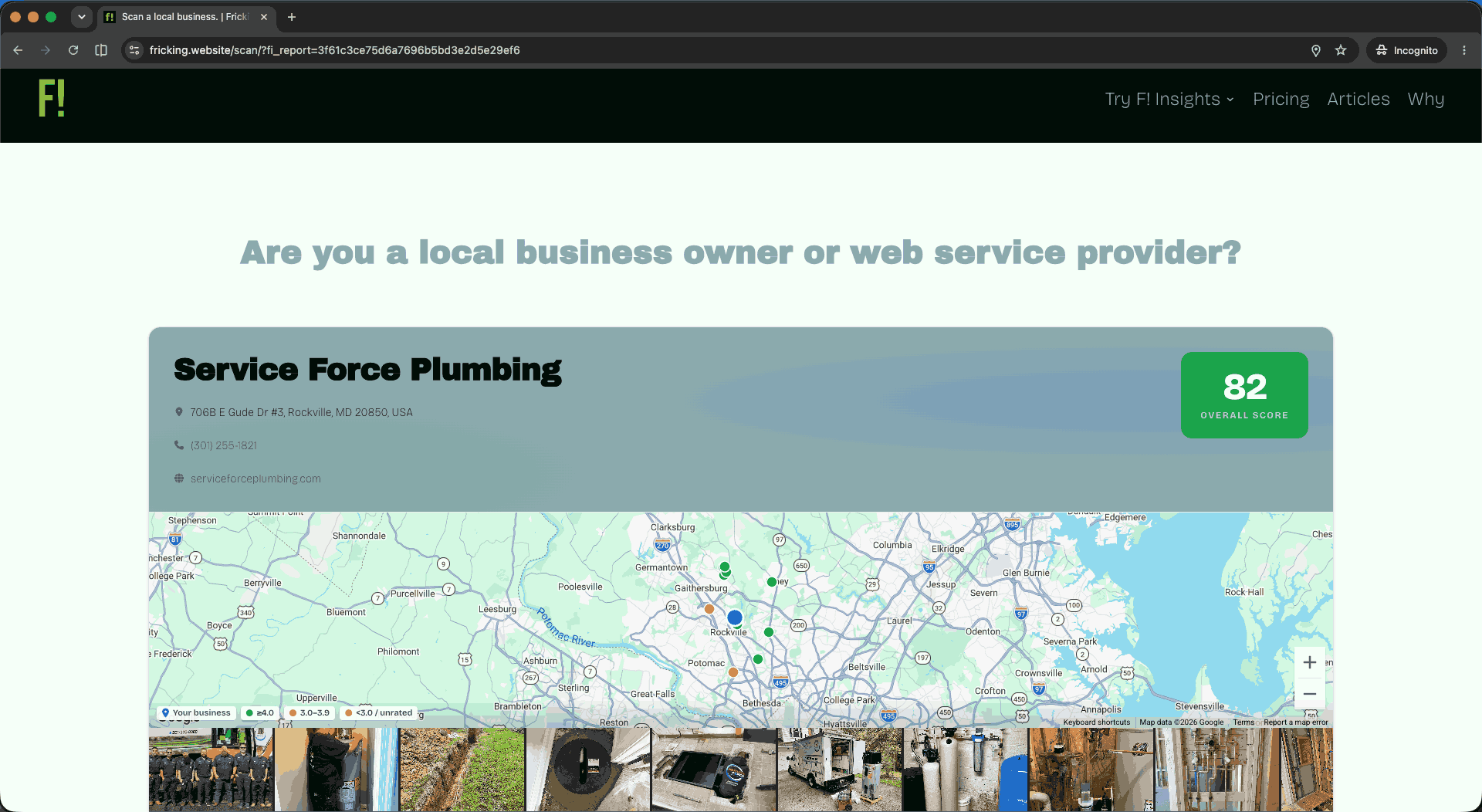
Give local SEO agencies a prospecting system that converts cold outreach into data-led conversations; and turns their growing scan database into a private market intelligence engine no competitor can buy.
“Your competitors are still cold calling. You show up with a scored diagnostic of their Google Business Profile and five named competitors. That is the conversation starter.”
A self-hosted WordPress plugin for local SEO agencies. One license, unlimited client seats, no per-location fees. The scanner drops via shortcode on any page; visitors scan any local business and receive a full AI-scored GBP audit across 8 categories, live Google data, real competitor names, in under 2 minutes.
- Free tier: Full scanner, unlimited scans, no lead capture.
- Paid tier: $300/mo or $3,000/yr. Lead capture, white-label branding, bulk prospecting, AI outreach, pipeline management, client workspace, Stripe billing, geogrid, post cadence, writing campaigns, and a progressive market intel layer.
Licensing via Polar.sh. API calls (Google + Anthropic) billed directly to the agency at cost, roughly $0.01–$0.05/scan. No markup. No middleman.
- a SaaS platform that owns your data
- a per-location subscription that penalizes growth
- a white-label product you can resell under your own brand (the admin still shows F! Insights)
- a replacement for a CRM (it hands off after the close)
The Challenge & Mission
Legend
Fricking Website started as a brand validation engine for early-stage founders.
It evolved into something more specific and more commercially viable: a plugin shop with one flagship product. The original concept still exists, at a lower priority.
The consultants who get the most out of this tool tend to be the ones serving communities that mainstream platforms consistently underserve: immigrant-owned small neighborhood businesses and operations without a marketing team or a $10k agency budget. A tool that helps those consultants do better work is, indirectly, infrastructure for those communities to show up.
This is still a rejection of the extractive model. The plugin does not take a cut of your leads. It does not rent you access to data. Your scan history, your lead pipeline, your market intelligence, all of it lives in your own WordPress database. When you uninstall, nothing gets sold.
The original buyer, an aspiring founder who wanted to validate an idea, was not the right fit for a paid tool. Early-stage founders do not have a budget. The people who did have a budget were already operating consultants who needed a pipeline, not a strategy.
Pivoted the commercial product to serve working digital marketing consultants, local SEO freelancers, and agencies.
The scanning and AI infrastructure from the original concept became the foundation. The lead capture, analytics, and Market Intel layers were built on top as the commercial differentiators.
The pivot sharpened the technical requirements considerably.
The plugin needed to handle real API costs at scale (Google Places + Claude per scan), so the dual-model architecture (separate Report Model and Admin Intelligence Model) became a deliberate commercial design decision, not an afterthought.
Polar.sh replaced a custom license system as Merchant of Record. The whole stack got tighter.
Product Strategy for F! Insights
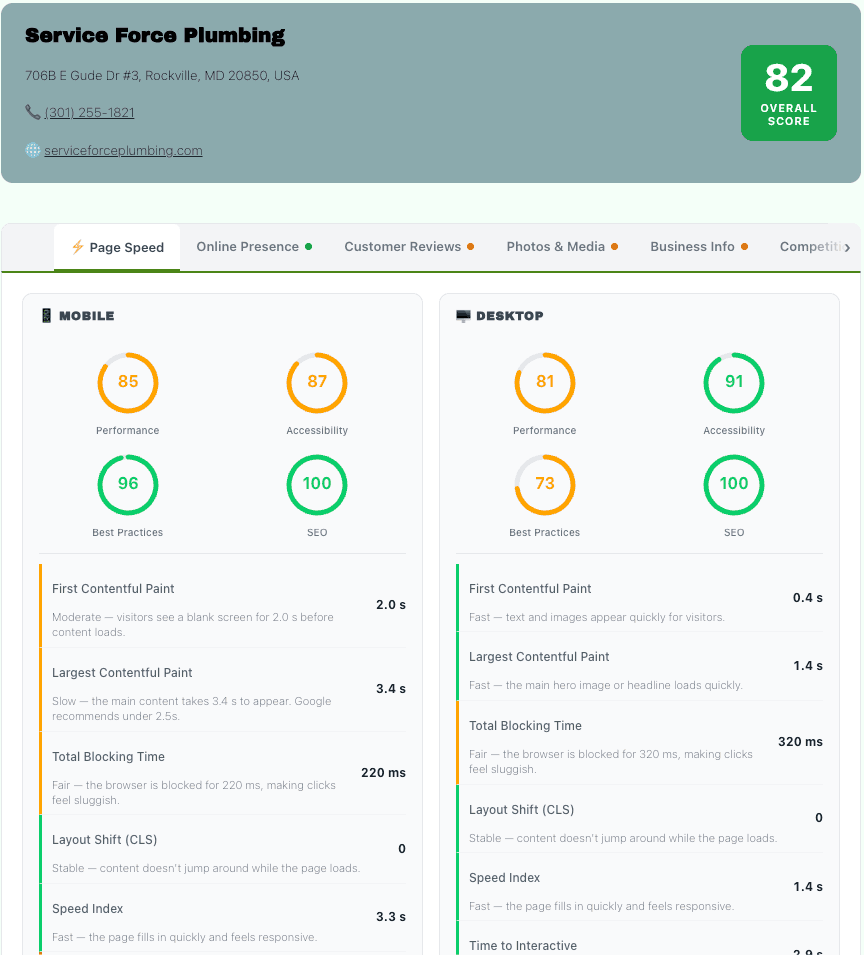
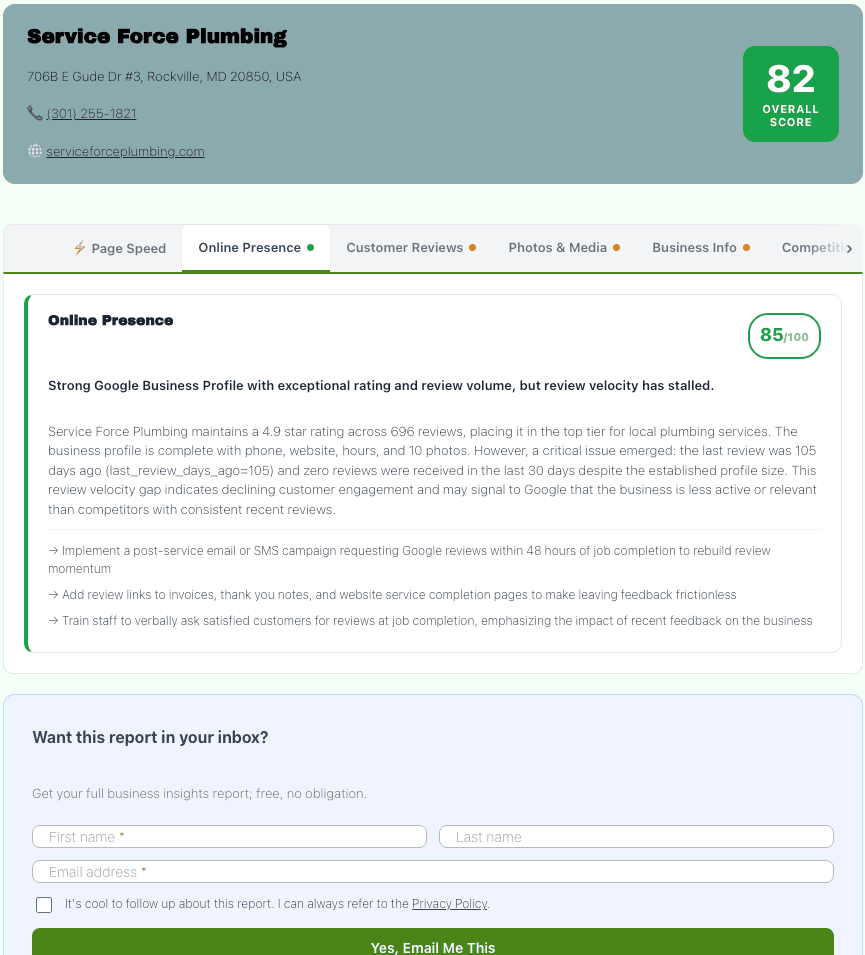
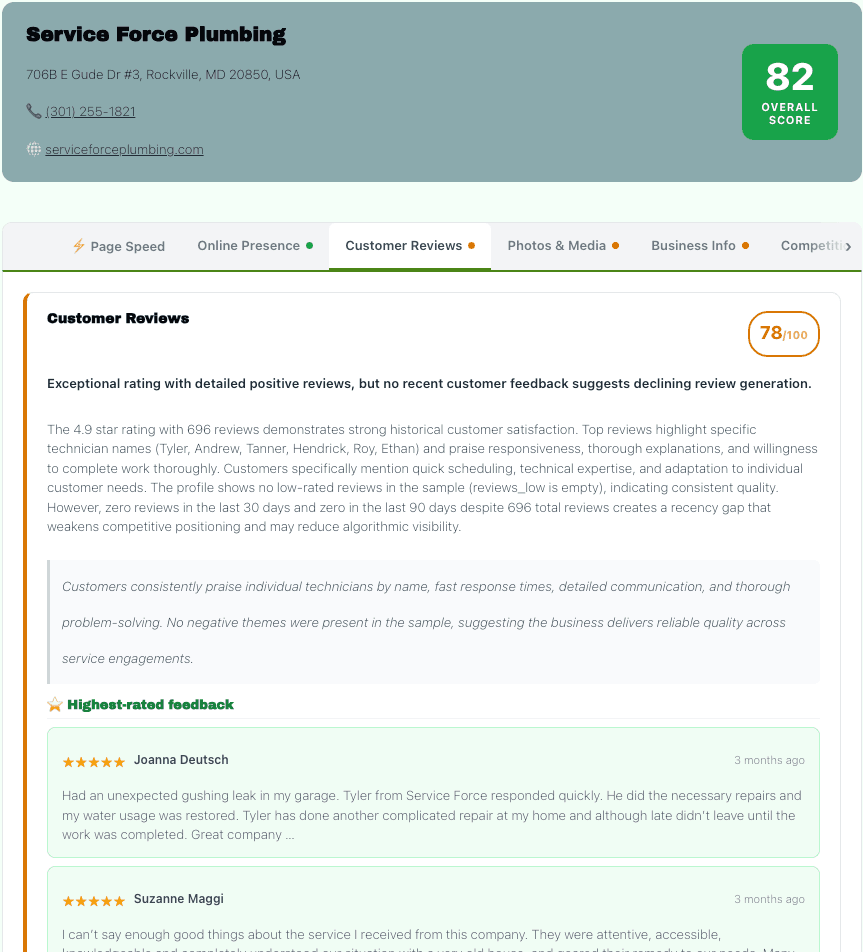
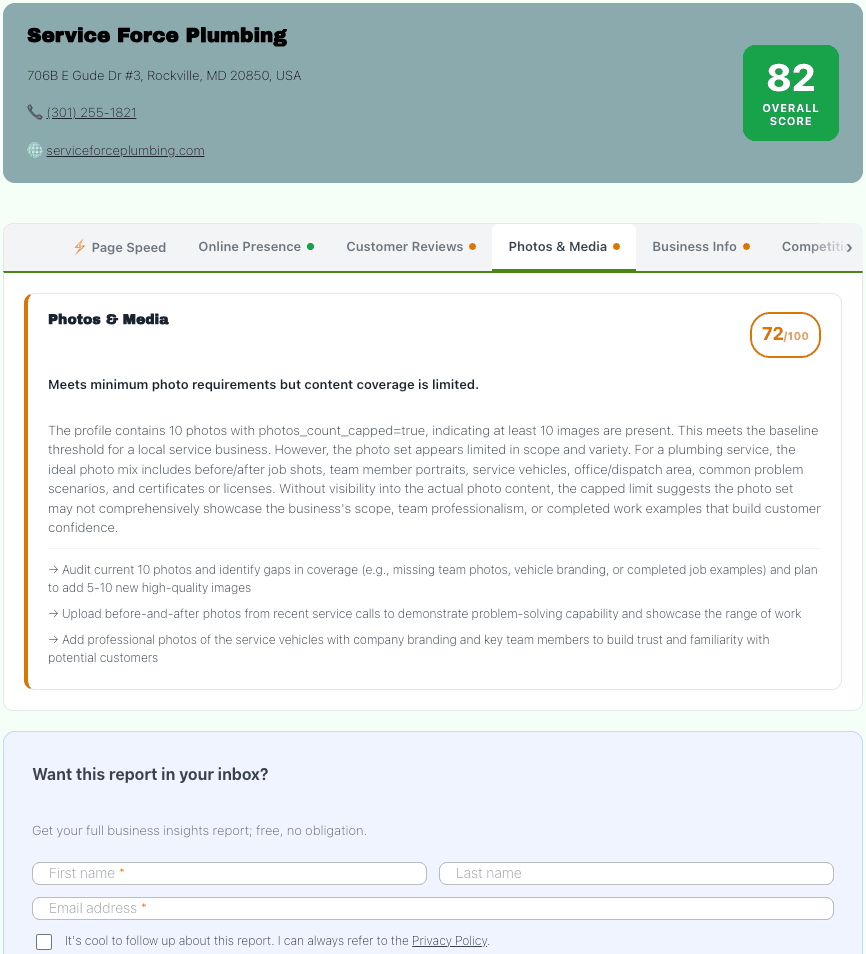
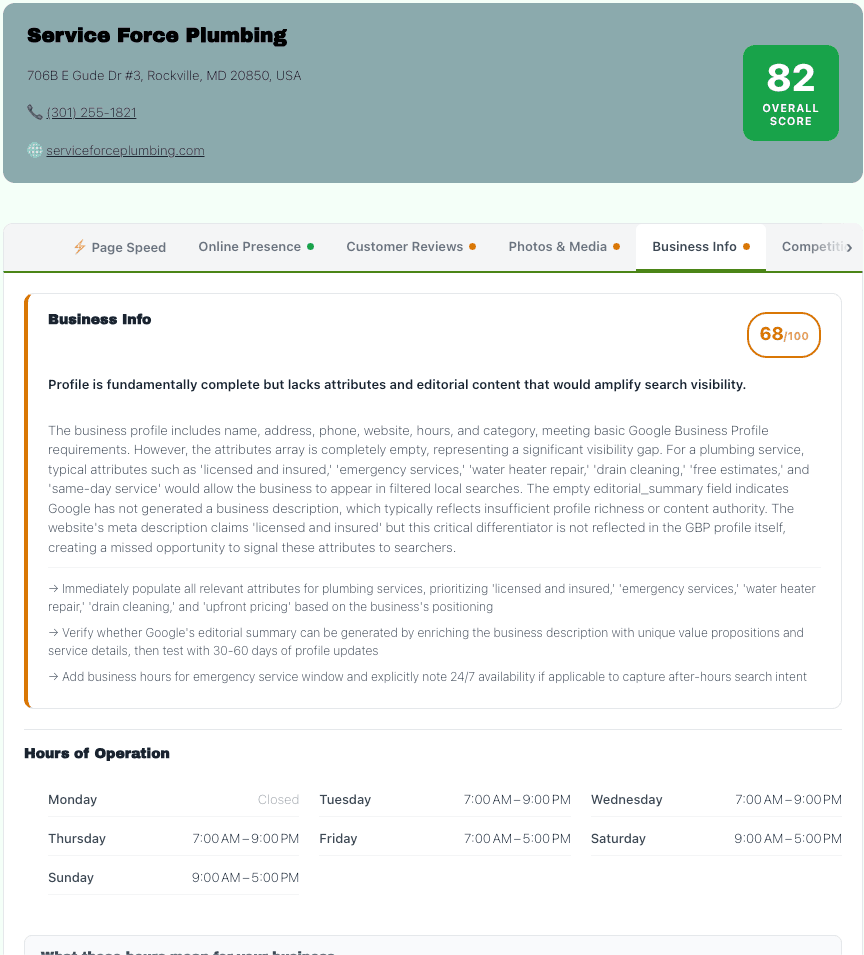
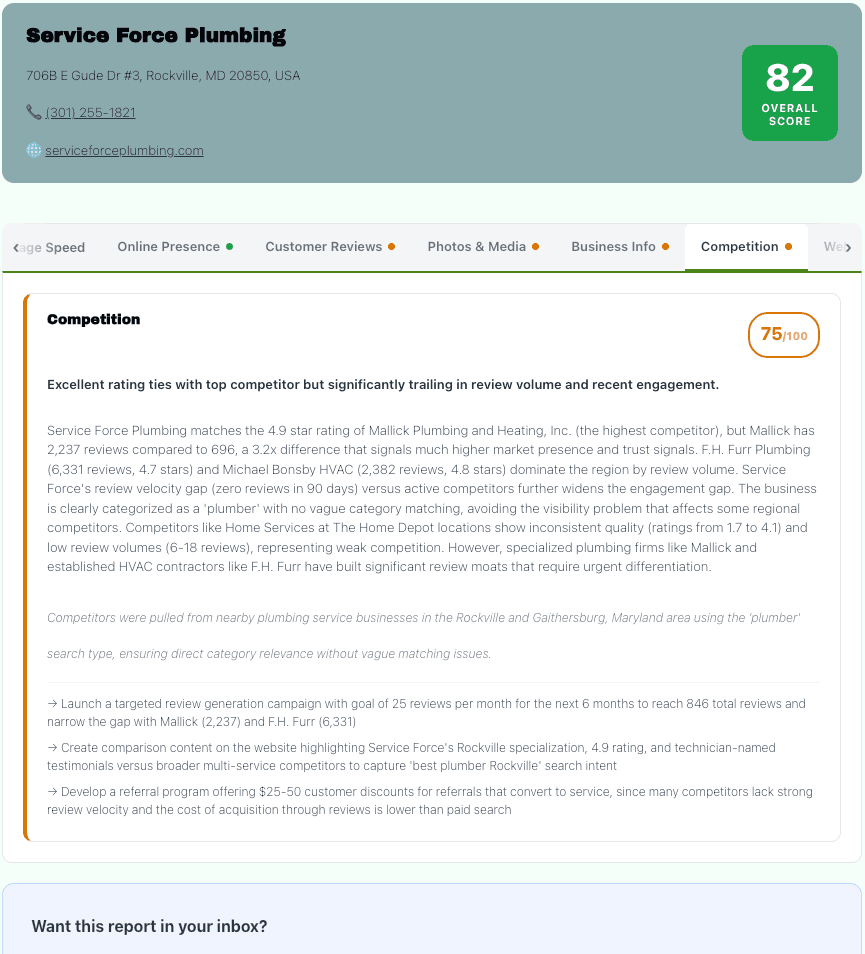
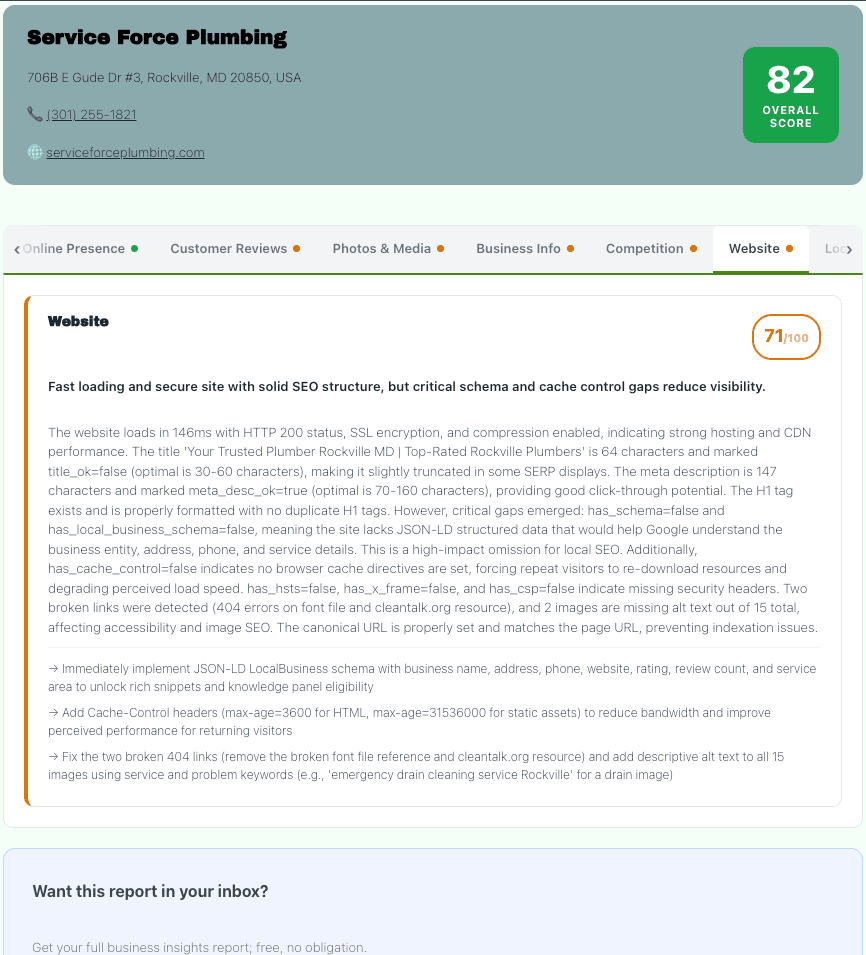
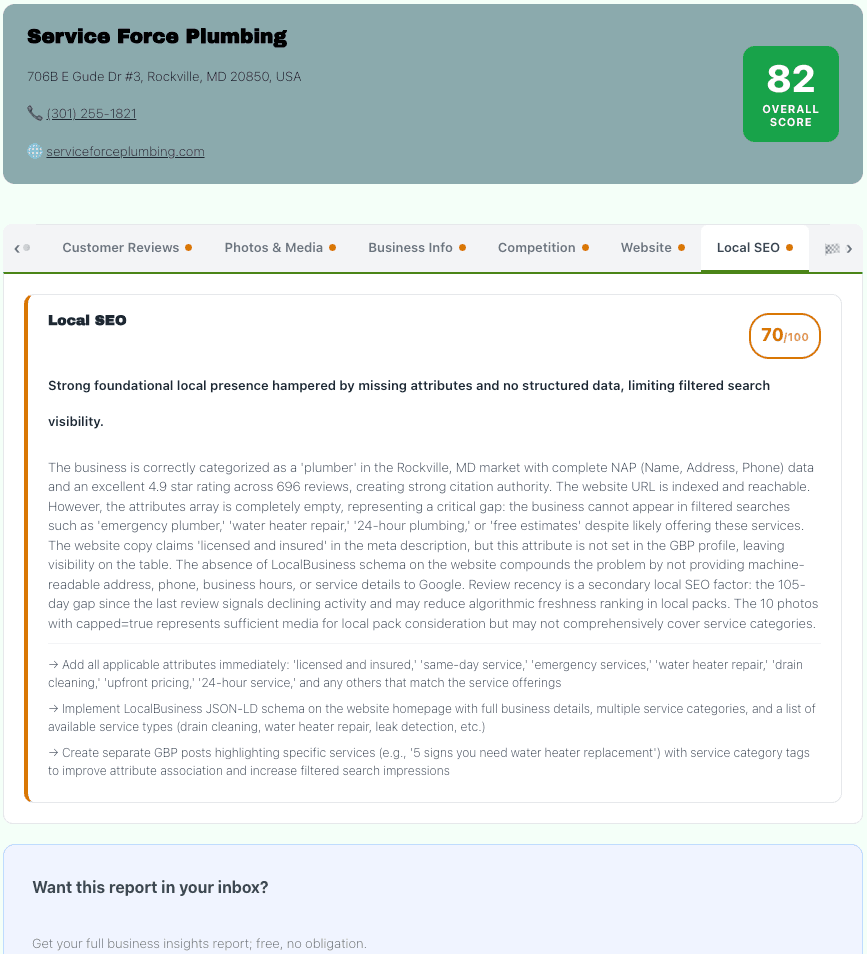
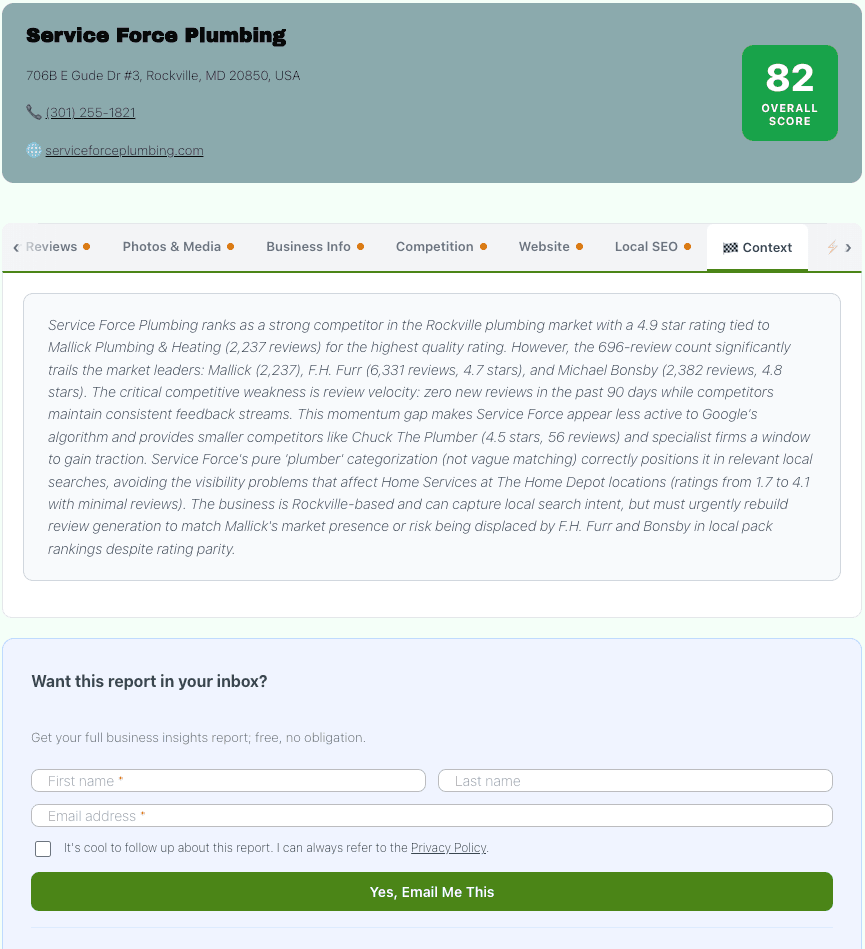
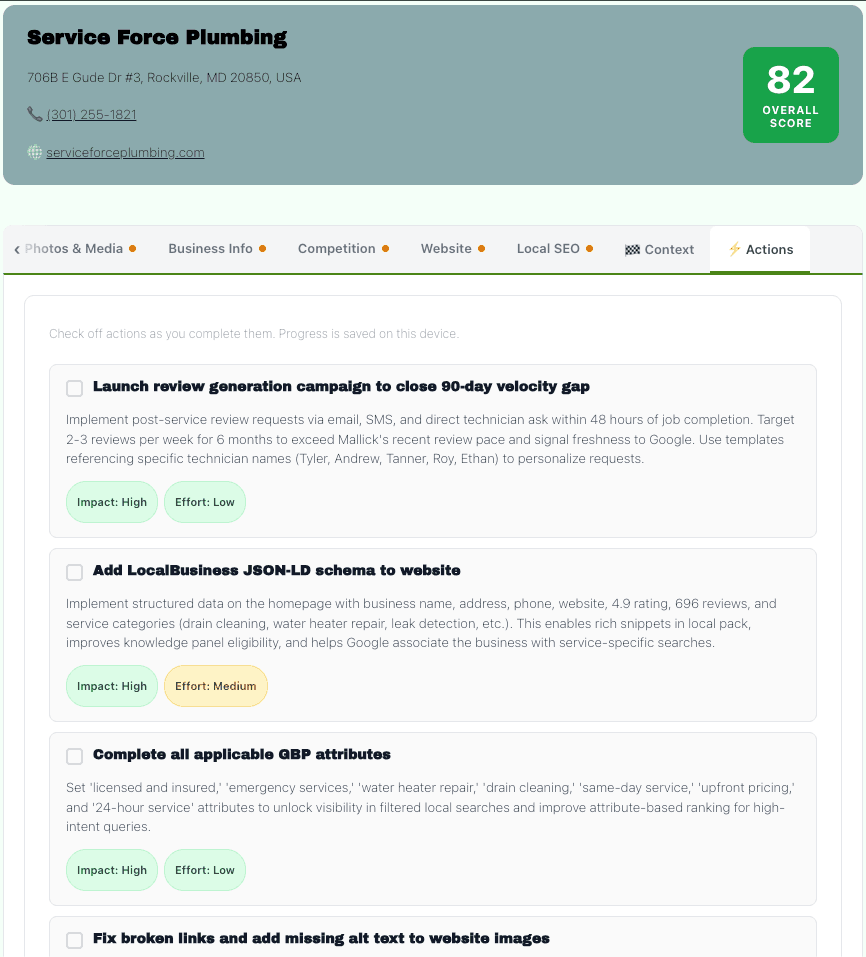
Any visitor types a business name. Google Places delivers live data, with profile details, photos, reviews, hours of operation, and competitors in the same category within a configurable radius.
PageSpeed Insights pulls Core Web Vitals for the business website. Claude receives the full structured payload and returns a scored diagnostic across 8 categories.
Results are cached in the WordPress DB with a configurable TTL (default 24 hours). Shareable token-based report links expire in 7 days. The whole scan costs roughly $0.02-0.05 depending on Claude model selection.
- Visitor types a business name
- Places API fetches data
- PageSpeed + competitor pull
- Claude grading pass
- Report renders in-page, under 90 seconds
The free version delivers the report.
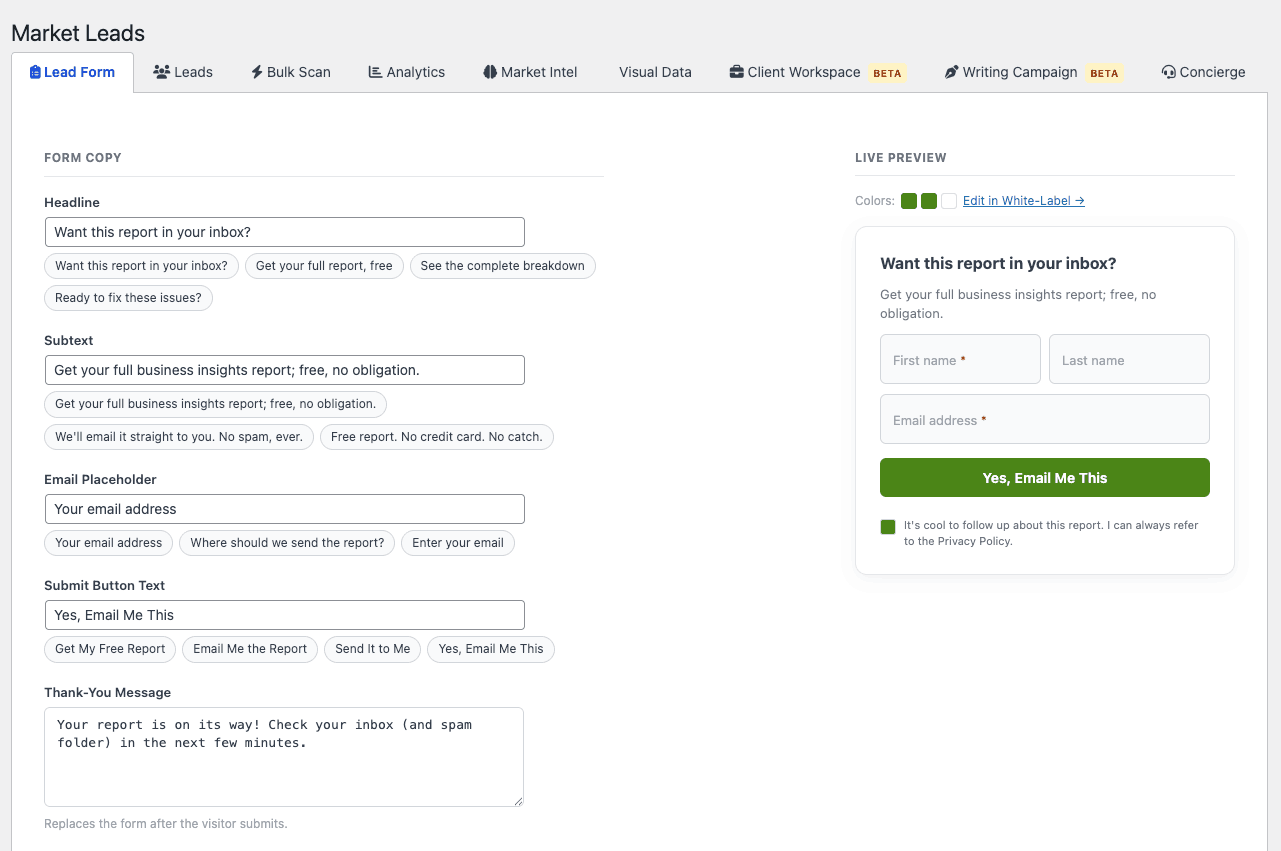
Premium captures the person. A configurable lead form (email required, optional fields: first name, last name, phone, role, employee count, custom question) gates or follows the report delivery. GDPR consent toggle with configurable privacy URL.
On submit: lead stored in wp_fi_leads, branded HTML report emailed to the visitor via wp_mail, admin notification sent (configurable threshold, only notify for leads below a score cutoff).
Market Leads dashboard: filterable pipeline table. Status tracking: new / contacted / qualified / closed / lost. Notes field. One-click rescan. AI cold pitch generation per lead, 3-sentence email drafted from their exact score and pain points.
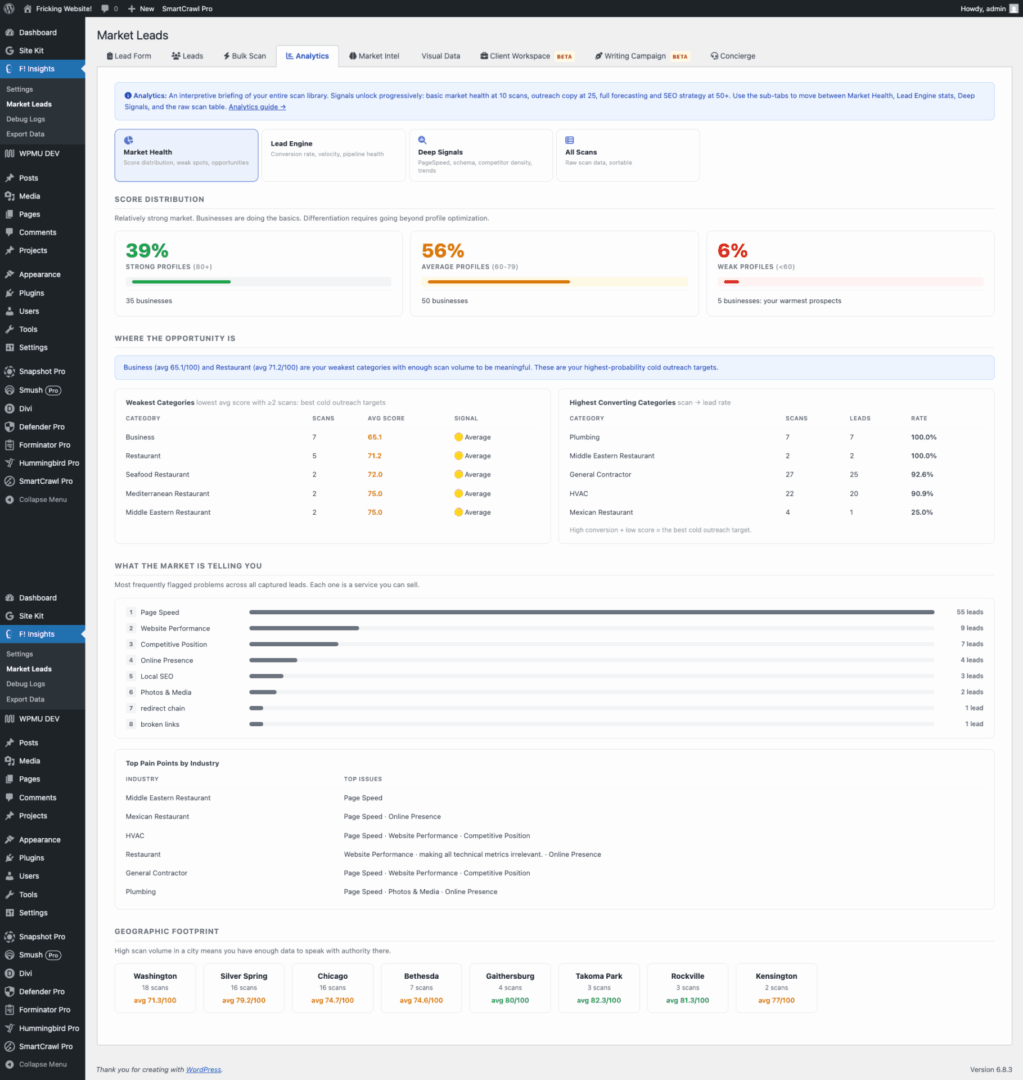
As scans accumulate, Claude analyzes the aggregate dataset and generates sales assets on demand. 30+ asset types across 5 tiers, unlocking progressively as scan count grows (10 / 25 / 50 / 100 / 250).
- 10 scans – Industry Report, Landing Page Copy, Prospect Hit List, Objection Cheat Sheet, Market One-Pager.
- 25 scans – Cold Outreach Sequence, Pitch Deck Script, Discovery Call Script, Social Media Series, Pricing Anchor Script.
- 50 scans – Content Strategy, Annual Market Report, Partnership Pitch, Competitor Gap Analysis, Case Study Template, Webinar Outline, Video Script Series, Proposal Template.
- 100 scans – Press Release, Franchise Brief, Referral Partner Script, Newsletter Template, Media Pitch, Grant Proposal, White Label Package.
- 250 scans – Paid Intelligence Brief, Score Directory, Academic Partnership, City Hall Brief, Competitive Intel Service, Acquisition Package, Annual Summit.
Research & Insights
Finding: Every person who searches for their own business using a scanner is a warm lead. They self-identified as someone who cares about their online presence before the consultant ever reached out.
Impact: The tool captures contact info at the moment of highest intent, right after the prospect sees a scored diagnostic of their own business. The conversation starter is already built into the report.
Finding: Claude API costs vary significantly by model. Running Opus on every scan would make the plugin economically unviable for high-volume users.
Impact: Dual model architecture: Report Model (Haiku by default, ~$0.02/scan) for public scans and Admin Intelligence Model (configurable up to Opus) for Market Intel and pitch generation. Consultants control their cost surface.
Finding: Consultants who build a local market practice accumulate proprietary data: scan history, lead pipelines, and pain point patterns. That data should belong to them, not a SaaS platform.
Impact: Everything lives in the consultant’s own WordPress DB. Three custom tables: fi_scans, fi_leads, fi_shares. No data is sent to or stored by the plugin author. Uninstall drops the tables cleanly, but only after an explicit opt-in warning.
Finding: The consultant audience is skeptical of closed platforms. They have been burned by tools that change pricing, lock data, or get acquired and killed.
Impact: Free tier distributed on WordPress.org (GPL-2.0+). Premium gated by Polar.sh, but the underlying plugin code is open. If Polar disappeared tomorrow, the plugin would still work; the only thing that would break is the license check.
UX & Design
Personas
Motivation: Generate leads that are already sold on the problem before the first call. Walk into the conversation with data, not a pitch deck.
Barrier: Cold outreach is expensive in time and morale. Most lead gen tools require significant setup or ongoing ad spend to produce anything usable.
Opportunity: One shortcode on one page. Drive traffic through existing channels. The scanner does the qualifying.
Motivation: Understand why their business is not showing up on Google. Get a free, honest assessment without being sold to immediately.
Barrier: Distrust of marketing tools. They have filled out “free audit” forms before and been bombarded with sales calls.
Opportunity: The report delivers real, specific data: their actual star rating, real competitor names, and their PageSpeed scores. The specificity earns trust. The email form comes after the value is delivered, not before.
Four tabs: Lead Form (configure capture fields), Leads (pipeline table with status, notes, AI pitch), Analytics (scan velocity, score distribution, pain point frequency, conversion rate), Market Intel (tiered action launcher).
The threshold system in Market Intel is deliberate: actions unlock as scan count grows. The UI makes the progression visible with tier badges rather than hiding behind a generic “not enough data” state. Every threshold crossed feels like an unlock, not a gate.
Key User Flow Journeys
- Discovery: A consultant shares the scanner page link via cold email, social media, or direct referral.
- Search: Visitor types business name, Google Autocomplete with soft location bias from browser geolocation.
- Scan runs: Google Places + PageSpeed + competitor pull, Claude grading, report cached in DB.
- Report renders: 8-tab scored report, competitive narrative, and priority actions with localStorage checkboxes.
- Share link generated: A token-based URL with a 7-day expiry so the visitor can share their own report.
- The lead form appears: Configurable headline, subtext, and optional fields. Shown after the report.
- Visitor submits email: GDPR consent (optional). Email validated server-side.
- Lead stored: Saved to wp_fi_leads with scan_id, email, score, and extracted pain points.
- Branded report emailed: Full inline-HTML report sent via wp_mail. White-label branding, colors, CTA button.
- Admin notified: Optional notification email with lead summary. Configurable score threshold.
- View lead in dashboard: Market Leads, Leads tab. See score, pain points, email, and scan date.
- Generate AI pitch: One click, Claude drafts a 3-sentence cold email referencing the lead’s exact score and top issues.
- Rescan if needed: Clears DB cache and transient, next scan fetches fresh data from Google and Claude.
- Update status: new, contacted, qualified, closed / lost. Add notes.
- Export CSV: All leads with category, score, email, status, pain points, notes, and date.
Brand













The brand communicates specificity and competence to a consultant audience that is deeply skeptical of marketing language. No “leverage,” no “synergy,” no “game-changer.” The copy is benefit-led and specific. If the copy could apply to any tool in the category, it is rewritten until it cannot.
“Direct. Competent. Slightly irreverent. The plugin is called Fricking. That is intentional.”
The word “Fricking” does two things at once: it signals irreverence (this is not a corporate product), and it functions as a search-friendly domain (fricking.website). The exclamation mark in the logo shorthand (F!) carries the same energy without spelling it out.
The flagship product name, Fricking Local Business Insights, is deliberately descriptive for the WordPress plug-in directory algorithm. No brand-speak.
Direct
State the thing. No euphemisms.
Specific
Reference real numbers and real behavior. “~$0.02/scan on Haiku.” Not “affordable API costs.”
Not
Not inspirational. Not apologetic. Not “game-changing.” The consultant audience will close the tab.
All six base colors are configurable per installation via the White Label admin tab.
CSS variables are injected as an inline :root block only when values differ from defaults, adding zero bytes to the page for unstyled installs. Hover variants are computed server-side in PHP from the base hex value.
Marketing (edu)
Skeptic-first
The consultant audience deletes marketing emails. Copy must demonstrate competence through specificity before it earns a click.
Benefit-led, not feature-led
“Every person who scans their own business just told you they care about their presence,” not “AI-powered report generation with 8 scored categories.”
No growth-hacking language
No countdown timers with fake urgency. The founders’ circle is 10 spots. When they are gone, the price changes.
Engineering
- PHP 8.0+
- WordPress
- Vanilla JS + jQuery
- MySQL
- Google Places API (New)
- Anthropic Claude API
Dual Claude model selector
Report Model (Haiku default, ~$0.02/scan) governs all public-facing scans. Admin Intelligence Model (Sonnet/Opus configurable) governs Market Intel and pitch generation. Separating them means consultants can run heavy AI on their backend without inflating per-scan costs.
Server-side photo proxy
Google’s Places API blocks direct browser photo requests with CORS. All photo delivery runs through a server-side AJAX proxy that validates the resource path against a strict regex before constructing the API URL.
f-insights/
├── f-insights.php
├── assets/css/ (frontend.css, admin.css)
├── assets/js/ (frontend.js, admin.js)
└── includes/
├── class-fi-scan-runner.php
├── class-fi-google.php
├── class-fi-claude.php
├── class-fi-grader.php
├── class-fi-analytics.php
├── class-fi-pitch.php
├── class-fi-leads.php
├── class-fi-share.php
├── class-fi-db.php
├── class-fi-premium.php
├── class-fi-rate-limiter.php
├── class-fi-taxonomy.php
└── admin/ (tab-api, tab-lead-form, tab-white-label)
- FI_Scan_Runner: Orchestrates the full scan pipeline: cache lookup, external data fetch, Claude grading, DB persistence, share link creation.
- FI_Google: All outbound Google API calls: Places (New), PageSpeed, Autocomplete, photo proxy.
- FI_Claude: Central Anthropic API wrapper, all calls, token tracking, model routing via options[model].
- FI_Grader: Builds the structured Claude prompt, then parses and validates JSON response, with a fallback report on failure.
- FI_Analytics: Aggregated market data + 30+ AI content asset prompts (Market Intel). Uses Admin Intelligence Model.
- FI_Pitch: Per-lead cold email generation, 3-sentence format, score + pain points in prompt.
- FI_Premium: Freemius license gate, single is_active() check used everywhere in the plugin.
- FI_Taxonomy: Maps Google Places types[] to normalized industry categories for competitor search.
Artifacts
fricking.website Live marketing site. Product page, pricing, /why manifesto, /docs full technical documentation, /google live scanner demo.
F! Insights plugin:
- V1.0.28
- 19 DB tables
- dual Claude model routing
- 10-tab Client Workspace
- Viz REST API
- Writing Campaign
- Near Me Visibility
- Stripe client billing
- AES-256-CBC key encryption
- Licensed via Polar.sh.
Docs: Full setup and optimization guide at fricking.website/docs. Covers API config, shortcode reference, bulk scanner, Client Workspace sub-tabs, Viz embeds, Writing Campaign, and a 5-stage optimization guide for agencies.
ROI Calculator: Interactive calculator on the product page; inputs: monthly scans, close rate, deal size, retainer conversion, hourly rate, active managed locations. Conservative defaults. Outputs: new projects/mo, retainer ARR, year-1 potential, time savings, BrightLocal comparison.
Final Thoughts
I designed F! Insights as a Fricking Website flagship product to extract meaningful intelligence from website behavior and turn it into something actionable.
Most tools confuse complexity with intelligence. This one favors clarity, computation, and output. Transparent by design. Unapologetically capable.